 Install FontSwap

Use JetBrains Mono. It’s free under the SIL Open Font License, it has weights from 100 to 800, and Ghostty and WezTerm already ship it as their default. On Windows Terminal, keep the default Cascadia Mono, or switch to Cascadia Code if you want ligatures. Only install a Nerd Font if your prompt or file manager shows icons, and skip it in Ghostty, WezTerm and Kitty, because they bundle the symbols.
This post covers the setup: what each terminal uses out of the box, how to change it, and what ligatures and Nerd Fonts actually change. For a ranked list of terminal fonts, see Best fonts for the terminal. For editor fonts, see Best Free Monospace Fonts for 2026. For box-drawing coverage and glyph widths, see the developer docs post.
What your terminal uses by default
We checked each terminal’s own documentation or default config. “Monospace” means the terminal asks your operating system for its default monospace font, so what you see depends on your system.
Four of the seven use a font chosen by the terminal’s makers, not by your system: Ghostty and WezTerm chose JetBrains Mono, Windows Terminal chose Cascadia Mono, and Zed uses its own .ZedMono, currently Lilex.
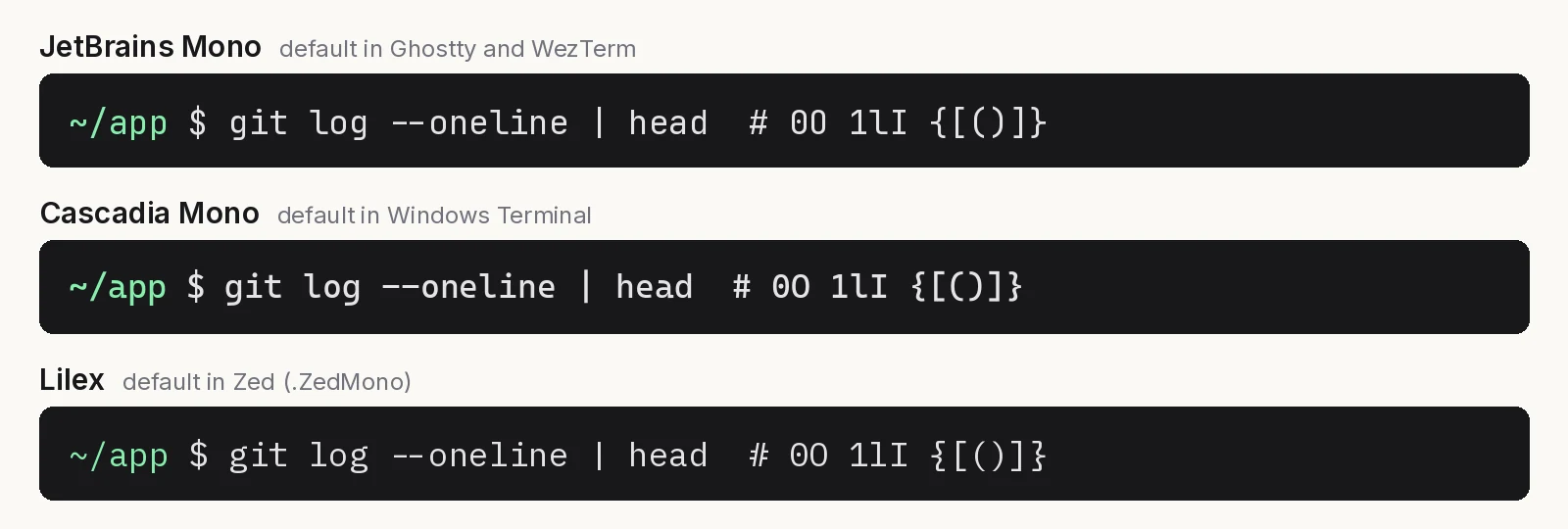
Rendered by us from the Google Fonts releases of each font. Measured from the same files, JetBrains Mono has the tallest lowercase of the three (x-height 0.550 em, against 0.518 for Cascadia Mono and 0.516 for Lilex), so it looks bigger at the same point size.
How to change the font
Each terminal has one line for this. Replace the family name with the font you’ve installed.
- Ghostty:
font-family = "JetBrains Mono"in the config file. Repeat the line to add fallbacks, and runghostty +list-fontsto see valid names. - WezTerm:
config.font = wezterm.font 'JetBrains Mono'inwezterm.lua. WezTerm adds its own fallback list after yours, so you don’t need to list the symbol fonts. - Kitty:
font_family JetBrains Monoinkitty.conf, or runkitten choose-fontsto pick one with a preview. - Alacritty: in
alacritty.toml, setnormal = { family = "JetBrains Mono", style = "Regular" }under[font]. Bold and italic reuse that family unless you set them. - Windows Terminal: in a profile, set
"font": { "face": "Cascadia Code" }. The default size is 12. - VS Code:
terminal.integrated.fontFamily. If you leave it empty, the terminal useseditor.fontFamily. - Zed:
"terminal": { "font_family": "JetBrains Mono" }. If you leave it out, the terminal followsbuffer_font_family.
Ligatures: on in four terminals, off or missing in three
A coding ligature draws =>, != or >= as one symbol. The characters in the file don’t change, only how they’re drawn. Most coding fonts put these in the calt feature, which is why the ligature switch in Ghostty, Zed and Windows Terminal names calt or liga.
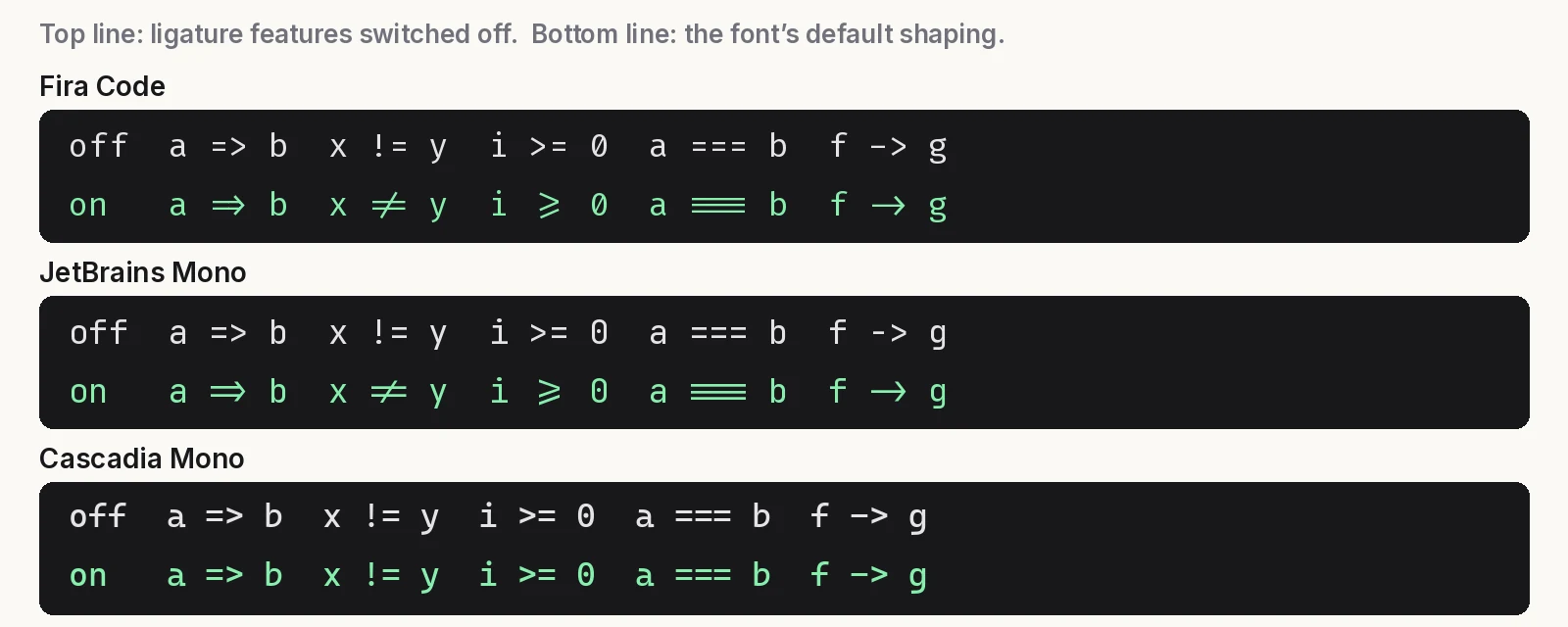
Rendered by us with HarfBuzz shaping. Fira Code and JetBrains Mono join the operators. Cascadia Mono doesn’t change, because Microsoft ships it as the no-ligature version of Cascadia Code.
Three cases are worth knowing:
- Alacritty doesn’t render ligatures at all. The request (issue #50) has been open since January 2017. If you want them, use another terminal. Any font still works, without the ligatures.
- The VS Code terminal has them off even if the editor has them on. Set
terminal.integrated.fontLigatures.enabledtotrue. - The Zed terminal has them off too, even with a ligature font. Add
"terminal": { "font_features": { "calt": true } }to your settings.
If you dislike ligatures, you don’t need a different font. Turn the feature off, or pick a “Mono” cut: Microsoft’s own docs say the “Code” variants of Cascadia include ligatures and the “Mono” variants exclude them.
Nerd Fonts: only if your prompt needs icons
Some prompt themes and file listers draw icons (a git branch, a folder, a language logo) from code points that normal fonts leave empty, so without the right font you see boxes. Nerd Fonts fixes this by patching developer fonts with over 10,000 icons from sets such as Font Awesome, Material Design Icons, Devicons and Octicons.
You need fewer of them than you think:
- Ghostty, WezTerm and Kitty bundle the symbols. Ghostty embeds the symbols-only Nerd Font next to JetBrains Mono. WezTerm’s docs say its default fallback includes Nerd Font Symbols, “which means that you don’t need to use specially patched fonts”. Kitty added a built-in Nerd Font in 0.36.0 (August 2024), used only when no system font has the symbol. Keep your normal font in these three.
- Basic Powerline arrows are often already there. We checked the Google Fonts files: JetBrains Mono, Fira Code, Source Code Pro, Victor Mono and Lilex all include the 7 original Powerline symbols (U+E0A0–E0A2 and U+E0B0–E0B3, the branch, line-number and lock signs and the four arrows). Cascadia, Geist Mono and IBM Plex Mono don’t. None of them has the wider Nerd Font icon sets.
- On Windows Terminal, use Microsoft’s own builds. The Cascadia Code repository ships
Cascadia Code PLandCascadia Mono PLwith Powerline symbols, andCascadia Code NFandCascadia Mono NFwith Nerd Font symbols.
If you do install a patched font, two naming details save a search. Fonts whose licence reserves the original name are renamed: IBM Plex Mono becomes BlexMono Nerd Font, Source Code Pro becomes SauceCodePro Nerd Font and Cascadia Code becomes CaskaydiaCove Nerd Font. Each family also comes in a “Nerd Font Mono” version with single-width icons; the default version draws them double-width.
Which font to pick
- You don’t want to think about it: JetBrains Mono. It’s the default in two of the seven terminals, it has a 100–800 weight axis, and it has the Powerline arrows built in.
- You’re on Windows Terminal: keep Cascadia Mono, or set Cascadia Code for ligatures and Cascadia Code NF for icons. All three come from Microsoft, and the Google Fonts version has a 200–700 weight axis.
- You want ligatures and use Alacritty: you can’t have both. Fira Code or JetBrains Mono still read well without them.
- You use Zed: the default, Lilex, is built on IBM Plex Mono and adds ligatures and the Powerline symbols. You can keep it; turn on
caltin the terminal settings if you want the ligatures there.
Every font we recommend here (JetBrains Mono, Cascadia Code and Mono, Fira Code, Lilex, Source Code Pro, Victor Mono, Geist Mono and IBM Plex Mono) is free under the SIL Open Font License, so you can use them at work and bundle them with your own tools. Each licence file is in the Google Fonts repository: JetBrains Mono, Cascadia Code, Cascadia Mono, Fira Code, Lilex, Source Code Pro, Victor Mono, Geist Mono and IBM Plex Mono. The system fallbacks in the table are different: Menlo and Consolas come with macOS and Windows under those systems’ licences, and Droid Sans Mono is under the Apache License 2.0. To compare them side by side, see Best Free Monospace Fonts for 2026 or the ranked terminal font list.