Free Alternatives to SF Mono

About SF Mono
- Foundry
- Apple Inc.
- Classification
- mono
- Style
- monospace
Brands Using SF Mono
Default code editor font in Apple's development environment
Default monospaced font in modern macOS Terminal
Monospaced font for log and system message display
The de facto coding font across the macOS and iOS developer experience
 See SF Mono live on these sites with FontSwap →
SF Mono is Apple's monospace typeface, designed as a companion to the San Francisco font family. Released in 2016, it has become the standard coding font across Apple's development ecosystem and is used in Xcode, Terminal, and throughout macOS and iOS. For millions of developers in the Apple ecosystem, SF Mono represents the default coding experience.
History and Design
SF Mono was created by Apple's typography team as part of the broader San Francisco type system. When Apple introduced San Francisco in 2015 as their new system font, they needed a monospace companion that would harmonize with it. SF Mono filled that role, providing consistent visual language across system interfaces and code editors.
It arrived into a lineage of Apple coding fonts. For years the Mac's default monospaces were Monaco — the classic bitmap-era face from the original Macintosh, still beloved for its old-school character — and later Menlo, a Bitstream-Vera-derived font that shipped as the Terminal and Xcode default through the early 2010s. SF Mono succeeded them not because they were bad, but because neither belonged to the new San Francisco family; a unified platform needed a monospace drawn to the same brief as everything else on screen. Understanding that succession explains why SF Mono feels less like a bold statement and more like the quiet closing of a gap.
The design prioritizes readability for code and technical content, with carefully balanced letterforms that maintain clarity at various sizes. SF Mono features a tall x-height and generous letter spacing that prevent characters from appearing cramped even in dense code. The team paid particular attention to character differentiation—essential for code where confusing '0' with 'O' or '1' with 'l' can cause debugging nightmares.
SF Mono is best understood as a design-system decision rather than a standalone typeface. Apple did not set out to make a great coding font that would top developers' preference polls; it set out to make a monospace that belonged to San Francisco, so that a struct in Xcode's editor felt like it shared DNA with the label on the button beside it. That constraint — harmony with the family first, coding-font virtuosity second — explains both its strengths (calm neutrality, tight platform integration) and its limits (no ligatures, no distinctive personality, no life outside Apple's walls).
While SF Mono isn't available for licensing outside Apple platforms, its influence extends throughout the developer font landscape. Many open-source alternatives cite SF Mono as an inspiration, and its clean, neutral aesthetic has become a template for what a modern, no-nonsense development environment is expected to look like. The irony is that its restrictions have arguably done more for the free-coding-font ecosystem than a permissive license would have: because so many developers loved the look but could not take it with them, the open alternatives raced to match it.
Why SF Mono Matters
SF Mono matters because of where it lives. It is not sold, marketed, or fussed over — it simply is the coding font for millions of developers who open Xcode or Terminal every day, which makes it one of the most-seen monospaces in the world despite never appearing in a foundry catalog. For a huge slice of the software industry, SF Mono is what code looks like.
Its significance is also about coherence. When Apple built the San Francisco type system, the goal was a single typographic voice spanning the entire platform — interface, marketing, and code. SF Mono is the monospace member of that family, tuned to sit beside SF Pro so a developer's tools feel like one continuous environment rather than a patchwork. That systemic fit is why Apple-ecosystem developers reach for it and why leaving the ecosystem — for a cross-platform project, a shared team config, or a web embed — is exactly the moment they need a free stand-in, because SF Mono's license does not travel.
Who is it for? Apple-platform developers who want their editor to match their OS, and anyone who values a calm, neutral coding font that recedes behind the code. It is not for developers chasing personality (the cursive-italic crowd) or for anyone who needs the font on a non-Apple system, where the alternatives below are the practical answer.
Design Characteristics
SF Mono is engineered for one job — making code unambiguous at a glance — and its features all serve that end:
- Optimized spacing: Carefully tuned metrics keep code readable across all weights without feeling cramped or loose.
- Distinctive characters: Clear differentiation between the classic code-font hazards —
0/O,1/l/I,rn/m— so a misread never becomes a bug hunt. - Six weights, Light to Heavy: A wider range than most coding fonts, enabling genuine hierarchy in editor chrome and syntax themes.
- Neutral, low-personality forms: SF Mono deliberately does not call attention to itself; it is the opposite of a characterful font like Dank Mono.
- Retina optimization: Drawn for high-DPI Apple displays, it renders crisply where its native hardware is concerned, which is most of the machines its target audience actually uses.
- Tall x-height, generous apertures: Open letterforms that stay clear at the small sizes editors run at.
- No ligatures: Unlike JetBrains Mono or Fira Code, SF Mono leaves operators as-is — a deliberate choice that some developers strongly prefer, since ligatures can obscure exactly which characters are on the line.
Where SF Mono Excels
SF Mono is at its best inside the environment it was made for, where its integration is worth more than any individual feature. On a Mac, in Apple's own tools, it is already there, already tuned, and already consistent with everything around it — no installation, no configuration, no mismatch between your editor and your OS. That frictionlessness is the whole value proposition:
- IDE and code editors: Its primary home — the default in Xcode and a favorite across editors on macOS.
- Terminal applications: Clean, unambiguous rendering for command-line work.
- Technical documentation: Code samples and snippets, especially within Apple's own developer materials.
- Developer tooling: Debuggers, profilers, and analysis interfaces where dense monospaced data must stay legible.
Where SF Mono Struggles
Almost every limitation of SF Mono comes down to a single fact: it is Apple's, and it stays Apple's. The design itself is excellent, but the moment your work crosses a platform boundary the font cannot follow, and its deliberate neutrality means there is little to miss it for once you have moved on. The practical constraints:
- Anything outside Apple platforms: The license restricts SF Mono to Apple's own OSes, so it cannot legally ship on the web, in a cross-platform app, or in a shared team setup — the single biggest reason to pick a free alternative.
- No ligatures: Developers who like
=>and!==rendered as single glyphs will find SF Mono bare next to JetBrains Mono or Fira Code. - No official distribution: There is no clean, licensed way to install it off-Apple, and unofficial extractions from developer downloads are a licensing grey area that is best avoided entirely, especially for anything commercial or shared with a team.
- Neutral to a fault: Its very lack of personality, an asset for focus, is a drawback for anyone who wants their environment to feel distinctive.
How to Choose a Free Substitute
Monospace is the best-served category in free type, so replacing SF Mono is genuinely easy — match on the one or two traits you actually care about.
For the closest all-round match, JetBrains Mono is the definitive pick: clean, neutral, superbly readable, and — unlike SF Mono — free everywhere, with programming ligatures if you want them. If ligatures are the priority, Fira Code has the deepest set of any free coding font. If you specifically dislike ligatures and want plain SF-Mono-style code, Fira Mono or Source Code Pro deliver clean, no-nonsense monospace (Source Code Pro adds a wide weight range and true italics). For a modern, SF-adjacent look on non-Apple platforms, Geist Mono is the natural choice, and if you want a code font with actual personality, Not Courier Sans is the free wildcard.
Whichever you choose, load it in your real editor at your real size with your theme and check the 0/O and 1/l/I clusters — SF Mono's whole reason for existing is that clarity, so any substitute has to earn it there first. And once you have picked one, commit to it across every machine and project: the practical advantage of a free, portable coding font over SF Mono is precisely that you can standardize on it everywhere, which is worth more day to day than the marginal polish of a font you can only use in one place.
Premium Font Neighbors
If you want to pay for a coding font and SF Mono is not available to you, its neighbors are the other polished, neutral monospaces plus the modern paid stars. Menlo and Monaco are the macOS system monospaces SF Mono effectively succeeded, and Consolas is their Windows counterpart. For more character, Dank Mono and Operator Mono bring cursive italics, while MonoLisa and Berkeley Mono are the two darlings of the current paid-coding-font wave, each with strong distinctive designs and wide weight ranges. Input Mono rounds out the field with an unusually configurable, highly legible system built specifically for code.
FAQ
What is the best free alternative to SF Mono?
JetBrains Mono is the best free alternative to SF Mono, offering similar clean proportions, excellent readability, and programming ligatures. It was designed specifically for developers and maintains the neutral, professional character that makes SF Mono appealing in development environments.
Can I use SF Mono outside Apple platforms?
SF Mono is technically available in macOS and iOS, but its license restricts use to Apple platforms only. For cross-platform projects or non-Apple development environments, JetBrains Mono or Fira Code provide excellent alternatives with permissive open-source licenses that allow use anywhere.
Does SF Mono support programming ligatures?
SF Mono does not include programming ligatures in its standard distribution. If you want ligatures for operators like => or ===, consider JetBrains Mono or Fira Code instead, both of which offer extensive ligature support while maintaining similar design aesthetics.
How does SF Mono compare to Monaco?
SF Mono replaced Monaco as Apple's default monospace font. SF Mono offers better rendering at various sizes, more weights, and improved character differentiation. Monaco was designed for earlier display technologies, while SF Mono is optimized for modern Retina displays.
Where can I download a free font similar to SF Mono?
JetBrains Mono is available free from Google Fonts or the JetBrains website. Fira Code can be downloaded from Google Fonts or GitHub. Both are licensed under OFL-1.1, allowing free use in personal and commercial projects without any restrictions. Source Code Pro and Fira Mono are also on Google Fonts, Geist Mono is available from Vercel, and Not Courier Sans is on Font Squirrel (under a GPL font-exception license).
Is SF Mono free?
Not in any usable sense. SF Mono ships with macOS and is present on Apple systems, but its license restricts it to Apple platforms — you cannot legally embed it on a website, bundle it in a cross-platform app, or share it in a team config for non-Apple machines. For anything beyond your own Mac, an open-licensed alternative like JetBrains Mono is the correct choice.
Can I use SF Mono on a website?
No. SF Mono's Apple-platform license does not permit web embedding, so it cannot be used as a webfont. If you want the SF Mono look on the web, JetBrains Mono or Geist Mono give you a clean, neutral, SF-adjacent monospace under open licenses that explicitly allow webfont use.
SF Mono vs JetBrains Mono — which should I use?
For work confined to Apple platforms, SF Mono integrates seamlessly with the system and needs no installation. For everything else — cross-platform teams, web projects, shared configs — JetBrains Mono is the better choice: it is nearly as clean and neutral, adds programming ligatures and a variable weight axis, and is free to use anywhere. Many Apple developers keep both and default to JetBrains Mono for portability.
Is SF Mono on Google Fonts?
No, SF Mono is a premium font from Apple Inc. and is not available on Google Fonts.
The closest Google Fonts alternative is JetBrains Mono with 92% similarity. Get it free on Google Fonts ↗
Free Alternatives (6)
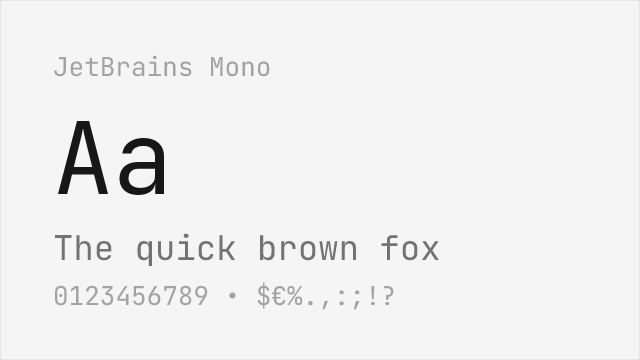
Excellent free alternative with programming ligatures and similar proportions
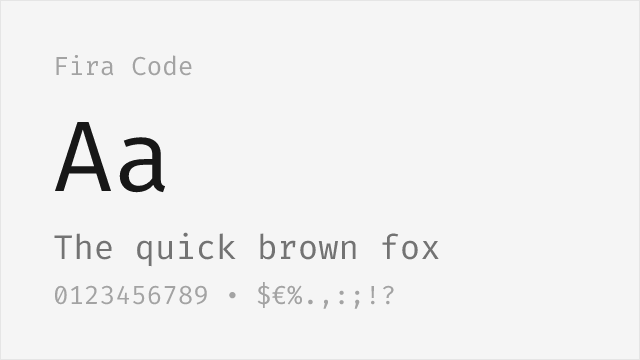
Popular coding font with extensive ligature support
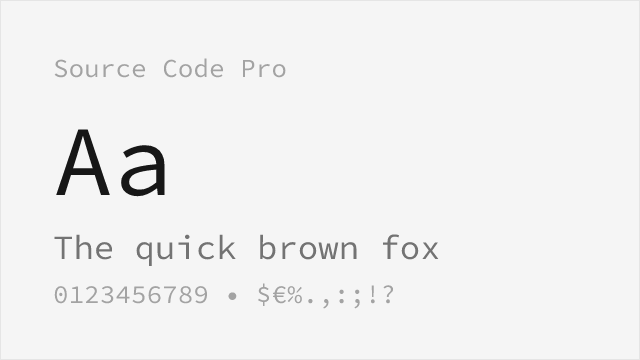
Adobe's clean monospace with similar neutral character
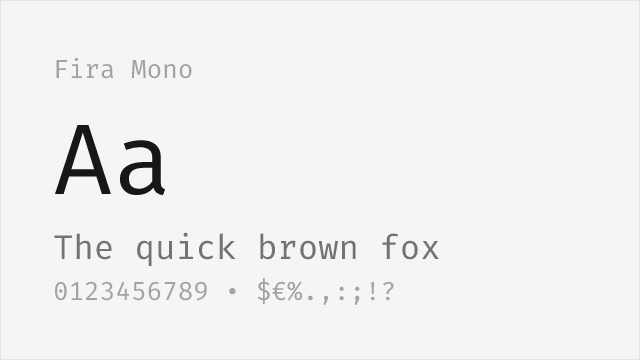
Mozilla's clean monospace without ligatures for straightforward code display
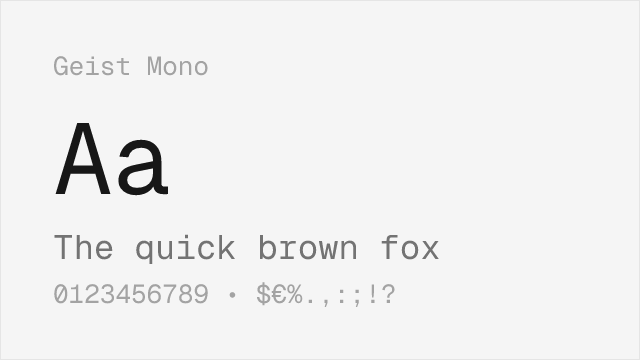
Vercel's modern monospace with a clean, SF-adjacent aesthetic
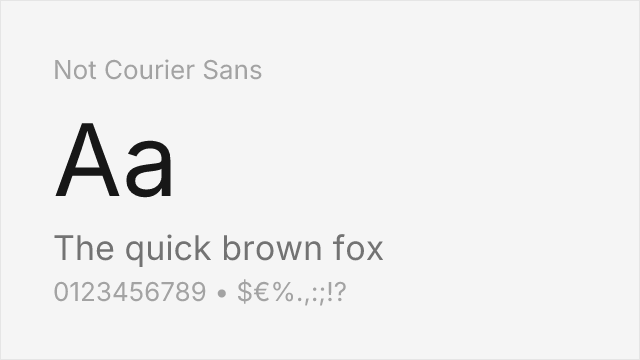
Raw experimental monospace for creative coding and distinctive terminal setups
Compare the alternatives
See how SF Mono compares to its top alternatives — and how those alternatives compare to each other — side by side.
See where SF Mono is used in the wild and swap to free alternatives live.
Install FontSwap →Replacement Summary
Source: FontAlternatives.com
Premium font: SF Mono
Best free alternative: JetBrains Mono
FontAlternatives similarity score: 92%
Replacement difficulty: Low
Best for: IDE and code editors, terminal applications, technical documentation, cross-platform development
Notable users: Apple Xcode, Apple Terminal, macOS Console
Not recommended when: Brand consistency with Apple Xcode requires exact letterforms
What is the best free alternative to SF Mono?
JetBrains Mono is the best free alternative to SF Mono with a FontAlternatives similarity score of 92%.
JetBrains Mono shares similar proportions, stroke characteristics, and intended use with SF Mono. It is available under the OFL-1.1 license, which permits both personal and commercial use at no cost.
This alternative works particularly well for: IDE and code editors, terminal applications, technical documentation, cross-platform development.
Can I safely replace SF Mono with JetBrains Mono?
Yes, JetBrains Mono is a high-confidence replacement for SF Mono. The FontAlternatives similarity score of 92% indicates strong structural compatibility.
Licensing: JetBrains Mono is licensed under OFL-1.1, which allows commercial use without licensing fees or royalties.
Weight coverage: Most weights have close or exact matches available.
When should I NOT replace SF Mono?
While JetBrains Mono is a strong alternative, there are situations where replacing SF Mono may not be appropriate:
- Strict compliance: Verify that OFL-1.1 terms meet your specific legal and compliance requirements.
Weight-Matching Guide
Map SF Mono weights to their closest free alternatives for accurate font substitution.
JetBrains Mono
| SF Mono | JetBrains Mono | Match |
|---|---|---|
| Light | Light (300) | close |
| Regular | Regular (400) | exact |
| Medium | Medium (500) | exact |
| Bold | Bold (700) | exact |
Fira Code
| SF Mono | Fira Code | Match |
|---|---|---|
| Regular | Regular (400) | exact |
| Medium | Medium (500) | exact |
| Bold | Bold (700) | exact |
Source Code Pro
| SF Mono | Source Code Pro | Match |
|---|---|---|
| Regular | Regular (400) | exact |
| Medium | Medium (500) | exact |
| Bold | Bold (700) | exact |
Fira Mono
| SF Mono | Fira Mono | Match |
|---|---|---|
| Regular | Regular (400) | exact |
| Bold | Bold (700) | exact |
Geist Mono
| SF Mono | Geist Mono | Match |
|---|---|---|
| Regular | Regular (400) | exact |
| Medium | Medium (500) | exact |
| Bold | Bold (700) | exact |
Not Courier Sans
| SF Mono | Not Courier Sans | Match |
|---|---|---|
| Regular | Regular (400) | close |
| Bold | Bold (700) | close |
Performance Guide
Production performance metrics for each alternative.
How to Use JetBrains Mono
Copy these code snippets to quickly add JetBrains Mono to your project.
CSS code for JetBrains Mono
@import url('https://fonts.googleapis.com/css2?family=JetBrains+Mono:wght@100..900&display=swap');HTML code for JetBrains Mono
<link rel="preconnect" href="https://fonts.googleapis.com">
<link rel="preconnect" href="https://fonts.gstatic.com" crossorigin>
<link href="https://fonts.googleapis.com/css2?family=JetBrains+Mono:wght@100..900&display=swap" rel="stylesheet">
Tailwind code for JetBrains Mono
// tailwind.config.js
module.exports = {
  theme: {
    extend: {
      fontFamily: {
        'jetbrains-mono': ['"JetBrains Mono"', 'sans-serif'],
      },
    },
  },
}

// Usage in HTML:
// <p class="font-jetbrains-mono">Your text here</p>
Next.js code for JetBrains Mono
// Using next/font (Next.js 13+)
import { JetBrains_Mono } from 'next/font/google';

const jetbrains_mono = JetBrains_Mono({
  subsets: ['latin'],
  weight: ['100', '200', '300', '400', '500', '600', '700', '800', '900'],
});

export default function Component() {
  return (
    <p className={jetbrains_mono.className}>
      Your text here
    </p>
  );
}

// Or using inline styles with Google Fonts link:
// <p style={{ fontFamily: '"JetBrains Mono"' }}>Your text</p>
Expo and React Native code for JetBrains Mono
// Install: npx expo install @expo-google-fonts/jetbrains-mono expo-font
import { useFonts, JetBrains_Mono_400Regular } from '@expo-google-fonts/jetbrains-mono';

export default function App() {
  const [fontsLoaded] = useFonts({
    JetBrains_Mono_400Regular,
  });

  if (!fontsLoaded) return null;

  return (
    <Text style={{ fontFamily: 'JetBrains_Mono_400Regular' }}>
      Your text here
    </Text>
  );
}
Recommended Font Pairings
These free fonts pair well with JetBrains Mono SF Mono for headlines, body text, or accent use.
Browse Alternatives by Context
Find SF Mono alternatives filtered by specific use case, style, or language support.
By Use Case
By Style
Frequently Asked Questions
What is the best free alternative to SF Mono?
JetBrains Mono is the best free alternative to SF Mono with a FontAlternatives similarity score of 92%. It shares similar proportions and characteristics while being available under the OFL-1.1 license for both personal and commercial use at no cost.
Is there a free version of SF Mono?
There is no official free version of SF Mono. However, JetBrains Mono is available under the OFL-1.1 open-source license and achieves a FontAlternatives similarity score of 92%. It includes variable weights and supports latin, latin-extended.
What Google Font looks like SF Mono?
The Google Fonts most similar to SF Mono are JetBrains Mono, Fira Code, Source Code Pro. Among these alternatives, JetBrains Mono offers the closest match with a FontAlternatives similarity score of 92% and includes variable weights for flexible typography options.
Can I use JetBrains Mono commercially?
Yes, JetBrains Mono can be used commercially. It is licensed under OFL-1.1, which allows free use in websites, applications, print materials, and commercial projects without purchasing a license or paying royalties.
Is JetBrains Mono similar enough to SF Mono?
JetBrains Mono achieves a FontAlternatives similarity score of 92% compared to SF Mono. While not identical, it offers comparable letterforms, proportions, and visual style. Most designers find it works excellently as a substitute in web and print projects.
What are the main differences between SF Mono and its free alternatives?
Free alternatives to SF Mono may differ in subtle details like letter spacing, curve refinements, and available weights. Premium fonts typically include more OpenType features, extended language support, and optimized screen rendering. However, for most projects, these differences are negligible.
Where can I download free alternatives to SF Mono?
Download JetBrains Mono directly from Google Fonts. Click the "Get Font" button on any alternative listed above to visit the official download page. Google Fonts also provides convenient embed codes for seamless web integration.