 Install FontSwap
Liberation Sans
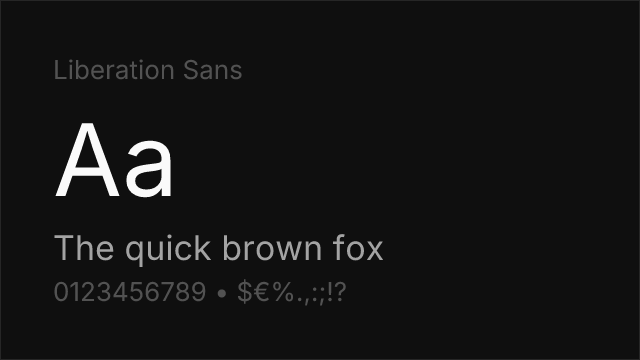
About Liberation Sans
- Source
- GitHub ↗
- Classification
- sans-serif
- Weights
- 400, 700
- Features
- Italics
Free to use, modify, and distribute. Can be used commercially without attribution.
What's allowed?
- ✓ Client work
- ✓ SaaS / Web apps
- ✓ YouTube / Video
- ✓ Sell products
- ✓ Print materials
Note: Derivative fonts must use the same license.
Full license guide →Liberation Sans is the sans-serif member of the Liberation family, released under the SIL Open Font License, Version 1.1. Its brief is narrow and useful: provide document layout compatibility with the three typefaces that dominate office documents. Liberation Sans corresponds to Arial, Liberation Serif to Times New Roman, and Liberation Mono to Courier New.
Why it exists
The Liberation fonts were commissioned to solve a specific institutional problem. Organisations moving off proprietary office software found that documents reflowed the moment Arial, Times New Roman or Courier New were unavailable — page counts changed, tables broke, and print runs came back wrong. Metric compatibility fixes that at the font level rather than the document level.
The result is that Liberation Sans ships as a default Arial substitute across most Linux distributions and is bundled with LibreOffice. If you have opened an Arial document on a Linux machine, you have very likely read Liberation Sans without noticing.
Liberation Sans vs Arimo
Both are OFL-licensed and both are metrically compatible with Arial, so the obvious question is which to use.
Arimo is on Google Fonts, has a variable weight axis covering 400–700, and adds Medium and SemiBold. If you are serving webfonts or want weights between Regular and Bold, Arimo is the easier choice.
Liberation Sans ships only Regular and Bold with italics, and is not on Google Fonts — you self-host from the GitHub releases. Its advantage is presence: it is already installed on a large share of Linux and LibreOffice systems, so in a font stack it may resolve locally with no download at all.
For document workflows that touch Linux, listing both is reasonable: Arial, "Liberation Sans", Arimo, sans-serif resolves locally for almost every user before falling back to a webfont.
Technical features
- Two weights: Regular 400 and Bold 700, each with a true italic
- No variable axis — use Arimo if you need one
- Metric compatibility with Arial across the Latin character set
- Script coverage: Latin, Latin Extended, Cyrillic and Greek
Where it struggles
The two-weight range is limiting for anything beyond documents; there is no Light for large display settings and no Semibold for UI labels. It is also, by design, completely anonymous — Liberation Sans exists to be a substitute, not a typeface anyone chooses for its character. And because it is not on a webfont CDN, using it on the web means self-hosting and managing the files yourself.
Is Liberation Sans on Google Fonts?
No, Liberation Sans is not on Google Fonts. It is available from GitHub ↗
Alternative For (2)
Liberation Sans is a free alternative to the following premium fonts:
Also metrically compatible with Arial; ships on most Linux systems and with LibreOffice.
Arial-metric clone; Arial itself matches Helvetica's widths, so it fits closely.
Compare Liberation Sans
See how Liberation Sans compares to other fonts side by side.
How to Use Liberation Sans
Copy these code snippets to quickly add Liberation Sans to your project.
CSS code for Liberation Sans
/* Download from: https://github.com/liberationfonts/liberation-fonts */
@font-face {
  font-family: "Liberation Sans";
  src: url('/fonts/liberation-sans.woff2') format('woff2');
  font-display: swap;
}
HTML code for Liberation Sans
<!-- Download from: https://github.com/liberationfonts/liberation-fonts -->
<link href="/fonts/liberation-sans.css" rel="stylesheet">
Tailwind code for Liberation Sans
// tailwind.config.js
module.exports = {
  theme: {
    extend: {
      fontFamily: {
        'liberation-sans': ['"Liberation Sans"', 'sans-serif'],
      },
    },
  },
}

// Usage in HTML:
// <p class="font-liberation-sans">Your text here</p>
Next.js code for Liberation Sans
// Import the font CSS in your _app.js or layout
import '/fonts/liberation-sans.css';

export default function Component() {
  return (
    <p style={{ fontFamily: '"Liberation Sans"' }}>
      Your text here
    </p>
  );
}
Expo and React Native code for Liberation Sans
// Install: npx expo install expo-font
import { useFonts } from 'expo-font';

export default function App() {
  const [fontsLoaded] = useFonts({
    'Liberation Sans': require('./assets/fonts/liberation-sans.ttf'),
  });

  if (!fontsLoaded) return null;

  return (
    <Text style={{ fontFamily: 'Liberation Sans' }}>
      Your text here
    </Text>
  );
}

// Download font from: https://github.com/liberationfonts/liberation-fonts